
Battery life
Background#
The battery in the sensor is not rechargeable, so the sensor must be returned to SENS Innovation when the battery has run out. The battery lasts at least 120 days when the sensor is turned on, and up to 2 years when it is turned off.
The battery status in the web app is updated each time the sensor is in contact with the SENS motion app. For more information on data transfer, see the article Transferring data from sensor.
Where to see the battery status#
The battery status of each sensor is shown in the Battery Level column on the Sensors tab. Below the battery icon, you can see the estimated number of days left, for example “Est. 73 days left”.
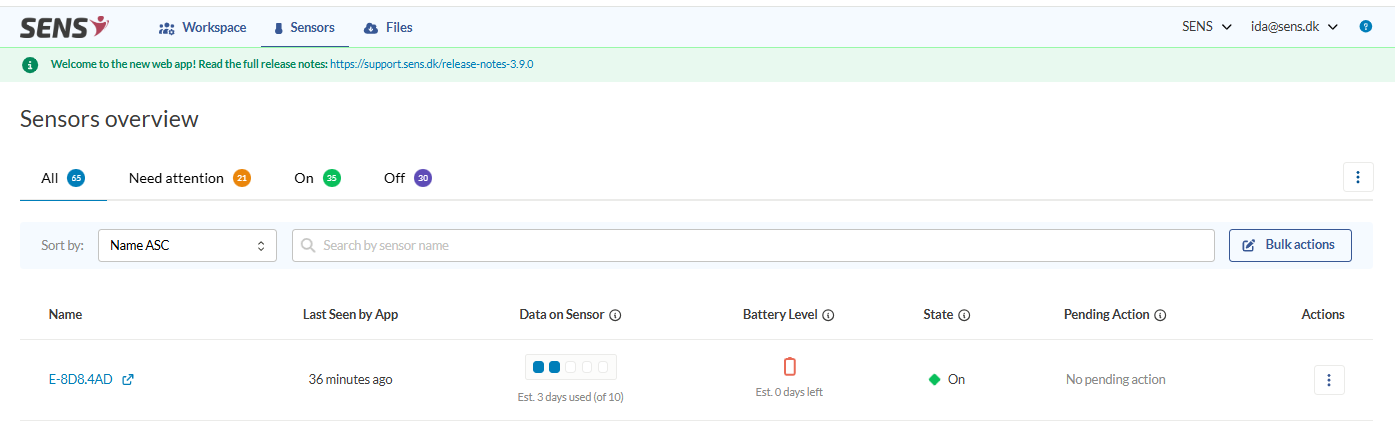
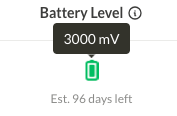
Hover the mouse cursor over the battery icon to see more details:
- Battery voltage – The latest voltage reading from the sensor (in mV)
- Status from – When the battery status was last updated by the SENS motion app
- Total days running – How many days the sensor has been turned on in total
How the estimate is calculated#
The estimated days left shows how long the battery is expected to last. It is calculated from:
- How long the sensor has been active
- The latest battery voltage
- Expected battery consumption patterns
Sensor batteries are supported for at least 120 days when the sensor is turned on. After this period, sensors may stop working at any time. When the number gets low (especially below 10 days), do not use the sensor for measurements meant to run for longer than that.
What the battery icons mean#
The colour of the battery icon gives a rough estimate of the battery status:
| Icon | Meaning |
|---|---|
 | Green – high battery level |
 | Yellow – medium battery level |
 | Red – low battery level |
 | Grey – the battery status has not been updated for more than 14 days, so the level shown may no longer be accurate |
 | Crossed out – the sensor assigned to the participant has been reused |
As the sensor always uses some power, a grey icon means it is not possible to say exactly how much battery is left. Open the SENS motion app near the sensor to update the battery status.