
Activity categories in Webapp and CSV export
This article consists of the following sections:
For a description of sleep parameters, see this article: Description of sleep parameters
Background#
Data are analysed in 5 second intervals and each interval is estimated to belong to a specific activity category. Different types of physical activity are displayed in unique colours. A measurement may appear on the web app like this:
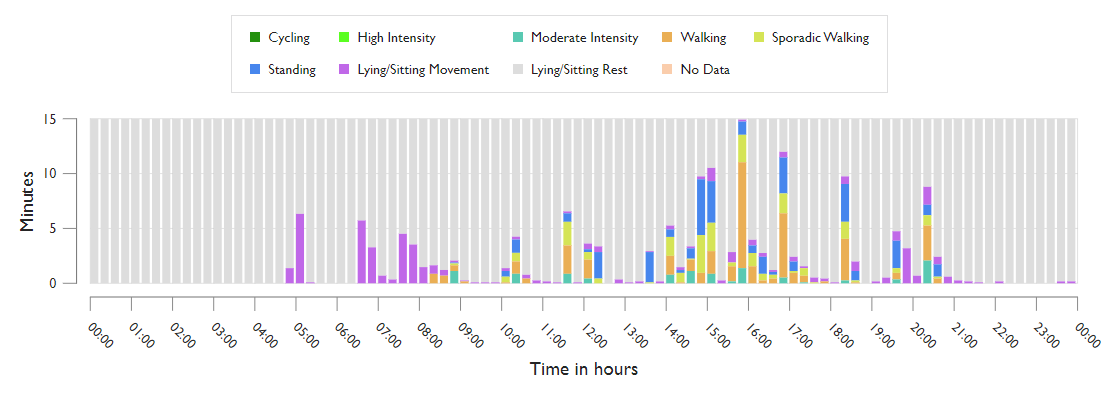
The data is analysed according to the intensity and frequency of the activity. Each bar in the graph represents 15 minutes. The activity categories are represented in the graph vertically with colours depending on the type of activity.
Activity categories in Webapp#
Measured activity is divided into 12 categories for data visualization on the web-app: 9 activity categories and 3 sleep categories. Each category below is named as in the web app, followed by its column name in an exported CSV file.
- No Data
- Lying/Sitting Rest
- Lying/Sitting Movement
- Standing
- Sporadic Walking
- Walking
- Moderate Intensity
- High Intensity
- Cycling
- Sleep categories
No Data (nodata)#
No data collected.
Lying/Sitting Rest (lying_sitting_rest)#
The participant sits or lies down with little or no movement.
The sensor is in a horizontal position (+- 45 degrees) and the intensity count is less than 2. At higher intensities, the movement may be classified as Lying/Sitting Movement.
This category should be seen as an indication of the participant being sedentary, sitting or lying down.
Lying/Sitting Movement (lying_sitting_movement)#
Movements of the participant in a lying or sitting state.
All movements in lying or sitting position (sensor is horizontal +- 45 degrees) and where the intensity count is above 2. Cycling might also fall into this category, as the sensor often is horizontal. The signal is further processed, see Cycling.
Standing (upright_stand)#
The participant stands upright.
The sensor is in a vertical position (+- about 45 degrees) and the intensity readings are lower than a minimum movement threshold of about 0.1 G. This category should be seen as an indication of the participant standing still with only minor insignificant movements recognised.
Sporadic Walking (upright_sporadic_walk)#
The participant stands upright, but with a few movements. The activity relates to Standing and Walking, but is a middle ground and irregular.
All movements in upright position where the vector magnitude is above the movement threshold, but below the moderate intensity and where the movement is not assigned to other categories. This will include epochs where an activity is starting towards the end of the epoch or taking a few steps before again standing still. Also cycling slowly for shorter periods will fall into this category.
Walking (upright_walk)#
The participant walks continuously.
Assigned when a repeating pattern is detected with:
- An intensity above the measurement threshold, but below the threshold for moderate activity
- A frequency above 0.2 Hz
- Asymmetrical movement, as only one leg takes a step forward at a time
This category should be seen as an indication of the participant walking for a period of 5-10 seconds continuously. Smaller walking intervals (trips) below 3-9 seconds will likely be detected as Sporadic Walking.
Moderate Intensity (upright_moderate)#
The participant is in a brisk walk, where the activity is higher than Walking, but lower than High Intensity.
Assigned to any walking activity above the walking intensity interval for a period of at least 3-9 seconds continuously. The intensity is higher than regular walking, but lower than high intensity activities such as running.
High Intensity (upright_run)#
The participant runs.
The high intensity category is used for any walking activity above the moderate intensity interval for a period of 3-9 seconds continuously (which is not recognised as cycling). This category should be seen as an indication of the participant running or doing high intensity training involving their legs. Smaller running intervals (trips) below 3-9 seconds will likely be detected as Moderate Intensity or Walking.
Cycling (cycling)#
The participant cycles.
A repeating pattern is recognised with a frequency above 0.2 Hz, where both legs move continuously, and the measured movement is symmetrical. This is recognised based on pattern recognition. Also, the intensity must be above the measurement threshold. This category should be seen as an indication of the participant doing a cyclic leg movement for more than 1-2 minutes (with pauses). Smaller cycling intervals below 1 minute are not seen often and will likely be detected as Walking or Sporadic Walking.
Sleep categories#
During the sleep period, activity is shown in three sleep categories instead. They are described in Description of sleep parameters.
| Category | Description |
|---|---|
| Sleep No Movement (sleep_no_movement) | The participant is without movement during the sleep period. |
| Sleep Movement (sleep_movement) | The participant moves during the sleep period, typically while lying down. |
| Sleep Active (sleep_active) | The participant is upright and moving during the sleep period. |
Other columns in exported CSV files#
Besides the categories above, an exported CSV file can contain the following columns. The timestamp columns (UTC, Local and Unixts) are explained in File formats for data export.
Sit-to-stand transitions (sit2stand)#
Activity is classified in approximately 5-second epochs, with each epoch being assigned a single activity category. A sit-to-stand transition is counted whenever two consecutive epochs meet the following criteria:
The first epoch is classified as either:
- general/nodata/time
- activity/lying_sitting_rest/time
The following epoch is classified as one of the upright categories:
- activity/upright_stand/time
- activity/upright_sporadic_walk/time
- activity/upright_walk/time
- activity/upright_moderate/time
- activity/upright_run/time
- activity/cycling/time
When such a transition occurs, a count value of 1.00 is assigned to the latter (upright) epoch only.
One important caveat is that if an epoch classified as activity/lying_sitting_movement/time occurs between the resting and upright epochs, the transition is not counted. In other words, only a direct transition from rest/no-data to an upright category will trigger a sit-to-stand count.
Steps taken (steps)#
The number of steps is counted during sporadic walking, walking or high intensity activities. Steps are also counted during the sleep period when the participant is upright and moving (Sleep Active), for example when getting up at night. The “Steps” category is further divided into 3 categories depending on the frequency of steps taken.
| Category | Description |
|---|---|
| Steps | Steps taken during continuous walking activity and training are based on an analysis in the frequency domain. The characteristic frequency of the walking motion is recognised during a 5 second interval, providing a step count. |
| Steps2 | Steps taken during sporadic walking where no continuous frequency can be recognised in the 5 second interval are summarized as 2 steps per 5 second sporadic walking interval, which has proven to be the average number for persons during non-continuous sporadic walking. |
| Steps3 | Steps taken during low intensity walking where a continuous frequency can be recognised in the 5 second interval are based on an analysis in the frequency domain. The characteristic frequency of the walking motion is recognised during a 5 second interval, providing a step count. |
Comparison to activity wristbands (smartwatches) and mobile phones: Steps taken with a very low intensity are included in the SENS motion step count, and as activity trackers in watches and mobile phones are usually less sensitive, the number of steps taken during low intensity activities such as cooking or cleaning will be larger with SENS compared to smartwatches and phones, which tend to underestimate the steps taken during such activities. To compensate for this, using only the steps column will provide a number comparable to wristband activity trackers.
Units of measurement#
The unit of measurement for each column is specified in the header after the second slash, e.g., ‘activity/upright_stand/time’.
When exporting a CSV file the categories are measured in two units: “count” and “time”.
| Unit | Description |
|---|---|
| Time | Duration of activity in seconds |
| steps/count | Number of steps taken |
| intensity/count | Refers to the intensity count. See details below |
Intensity count#
The intensity count is the numerical value of the magnitude of the movement vector when the contribution of gravity has been removed. This gives a measure of how strong the movement is, independent of the sensor’s orientation relative to gravity.
The intensity count is calculated as on the average overall movement magnitude from the dynamic accelerations within a 5 second interval. The dynamic accelerations are extracted from the measured 3-axis accelerometer data sampled at 12 Hz by removing noise and slow or steady signals—such as gravity or gradual sensor drift. This measurement gives a good indication of the intensity of the measurement. The intensity count in a 5 second interval is typically between 0-100, but it can be more than 100. It is not a maximum.
| Count | Category |
|---|---|
| 0-2 | Standing |
| 2-10 | Sporadic Walking (single steps) |
| 10-50 | Walking |
| 50-75 | Moderate Intensity (e.g. slow running) |
| 75> | High Intensity (e.g. fast running) |